






3D Printer Stand with Filament Storage,3D Printer Rack with Power Outlet,Heavy-Duty 3D Printer Storage Shelf for ABS/PLA/TPU Filament Spools,Perfect for 3D Printing Workshops, Retro Brown

 4.7 (19 items)
 Limited Time Sale
US$83.99 cheaper than the new price!!
Free cash-on-delivery fees for purchases over $99
Product details
| Management number | 211780146 | Release Date | 2026/04/04 | List Price | US$56.00 | Model Number | 211780146 | ||
|---|---|---|---|---|---|---|---|---|---|
| Category | |||||||||
- 【3-in-1 Functional Design】:3-Tier Heavy-Duty 3D Printer Stand - Holds up to 3 printers simultaneously (vs. single-printer stands).Beyond 3D printers, this 3d printer desk supports scanners and various heavy-duty equipment. Its multi-machine operation capability enhances productivity, making it ideal for everyone from home makers to professional 3D printing workshops
- 【Upgraded Filament Organizer】:This upgraded 3D printer rack features innovative side-mounted spool holders that keep your filament organized without occupying valuable workspace.The lift-and-load rod system makes changing filaments effortless – just raise the bar to swap spools in seconds.The side-mounted design lets you skip removing filament tubes – just load spools directly onto the rod.Each hook supports up to 15 lbs and accommodates various filament spool sizes (200g, 500g, and 1kg).Each printer station accommodates 6 different 3D filament colors–no more tedious spool swapping.Save time, boost productivity,all designed with your needs in mind
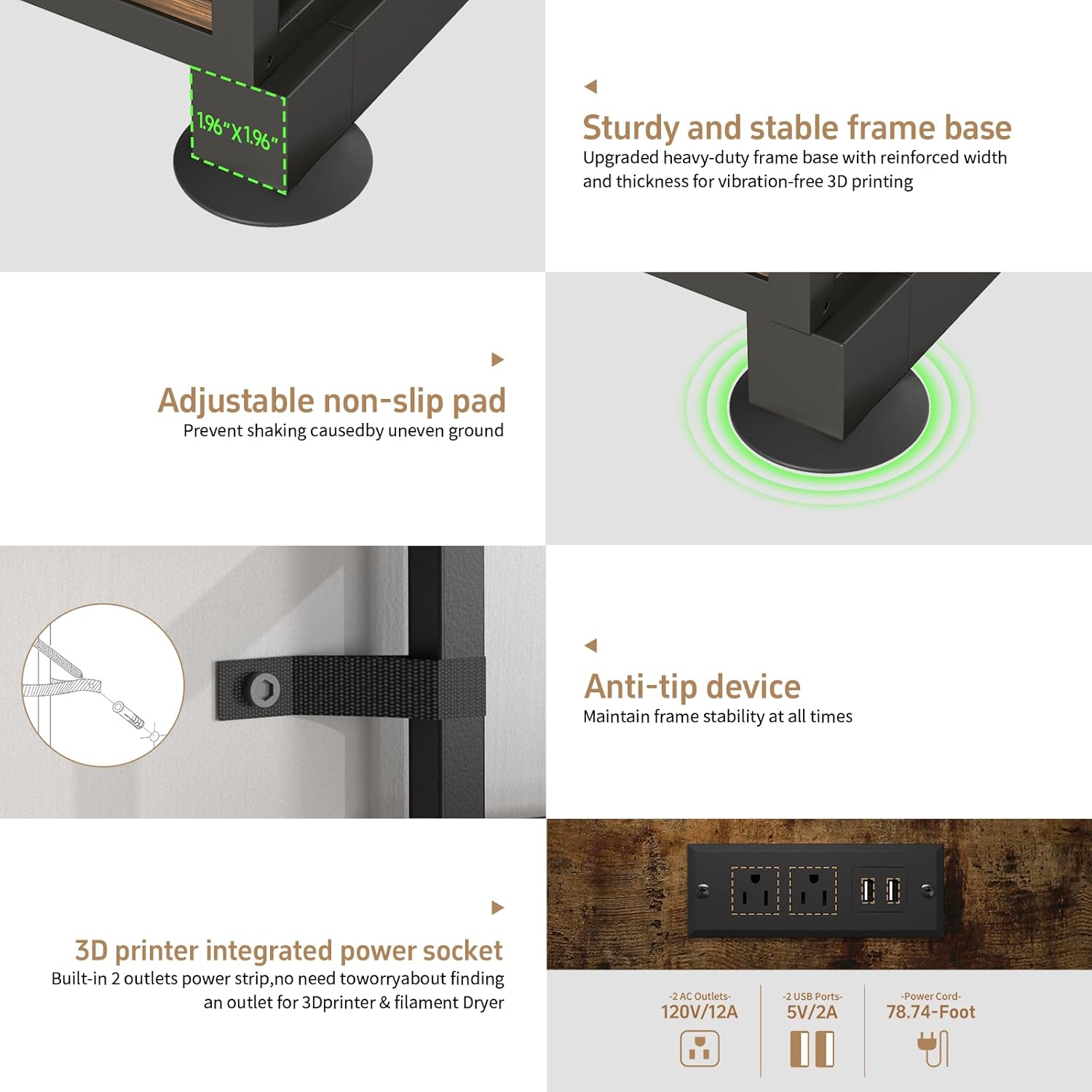
- 【Durable and Reliable Materials】:This 3D printer shelf with built-in filament storage combines a reinforced 20mm thick metal frame with 12mm premium scratch-resistant P2 particleboard. Featuring an extra-thick 50mm base support and adjustable anti-slip feet, it stays firmly planted during operation. With an impressive 150-lb load capacity, it reliably safeguards your 3D printer and materials. Plus, our upgraded anti-tip design eliminates stability concerns–whether from accidental bumps or printing vibrations–so you can focus on perfect prints with complete peace of mind
- 【Convenient Power Outlets】This 3D printer table comes with built-in power access—featuring 2 AC outlets and 2 USB ports mounted on the back panel of the second tier, keeping your desktop clutter-free. Powers your 3D printer, scanner, and other equipment simultaneously. No more tangled cords! The independent high-wattage circuit safely handles multiple devices, making it perfect for offices, workshops, garages, and other spaces
- 【Hassle-Free Assembly】:Tired of missing parts and confusing instructions? Our heavy-duty 3D printer organizer eliminates those headaches! We include a step-by-step guide with numbered hardware and all the tools you'll need. No technical skills required – anyone can set it up with ease
- 【Reliable After-Sales Support】:Shop with confidence!Your 3D printer desk is reinforced with high-density foam and shock-absorbing buffers to prevent shipping damage. The particleboard shelves are wrapped in multi-layer PE foam for scratch protection, . We’re here to help


| UPC | 756352353959 |
|---|---|
| Size | Medium |
| Color | Retro Brown |
| Shape | Rectangular |
| Set Name | 1 |
| Room Type | 3D Printing Lab, 3D Printing Studio, Home Office, Office |
| Brand Name | MILEFA |
| Item Depth | 19.68 inches |
| Model Name | PAB09 3d Printer Stand |
| Shelf Type | Tiered Shelf |
| Style Name | Industrial Style |
| Unit Count | 1.0 Count |
| Item Weight | 21 Pounds |
| Finish Types | Laminated |
| Manufacturer | MILEFA |
| Model Number | PAB09AR |
| Product Name | 3D Printer Rack, 3D Printer Shelf, 3D Printer Stand, 3D Printer Stand with Filament Storage, 3D Printer Stand with Storage |
| Material Type | Engineered Wood, Metal |
| Mounting Type | Floor Mount |
| Item Type Name | 1 |
| Item Dimensions | 1 x 1 x 1 inches |
| Number of Items | 1 |
| Shelf Thickness | 12 Millimeters |
| Weight Capacity | Minimum weight: 150 Pounds |
| Furniture Finish | Wood Grain |
| Installation Type | Freestanding |
| Number Of Shelves | 3 |
| Required Assembly | Yes |
| Additional Features | Durable, Heavy Duty, Rust Proof, Scratch Resistant, Space Saving |
| Included Components | 1* Installation Tool, 1*3D Printer Stand, 1*Installation Hardware, 1*Product Installation Guide |
| Shelf Bracket Shape | Straight |
| Age Range Description | 1 |
| Weight Capacity Maximum | 150 Pounds |
| Manufacturer Part Number | PAB09AR |
| Item Dimensions D x W x H | 19.68"D x 21.65"W x 64.37"H |
| Product Care Instructions | Wipe with Dry Cloth |
| Specific Uses For Product | 3D Printer Stand |
| Recommended Uses For Product | 3D Printing, 3D Printing Design |
| Assembly Instructions Description | This product features a modular design and requires no complex tools. Unboxing & Check: Please check all parts (posts, beams, shelves, screws) against the manual. Frame Assembly: Connect the four posts with beams using screws to form a stable rectangular frame. Install Shelves: Place the wooden shelves on the designated beams and secure them with screws. Install Accessories: Mount the side filament holders to the specified positions. Place Equipment: Once the structure is stable, place your 3D printers on the shelves. |
Bestseller ranking
3D Printer Accessories




Customers who viewed this product also viewed
Mexico national teams


Correction of product information
If you notice any omissions or errors in the product information on this page, please use the correction request form below.
Correction Request Form